

Automate · Reduce manual work
Business process automation that starts with the process
Most business process automation services start with the tools. We start with the process that is actually costing you time, then work out whether automation, or just a better spreadsheet, is the right answer. When it is automation, we usually build it in Power Automate on the Microsoft 365 you already have.
We reply within one working day. No obligation.
The work that fills the week
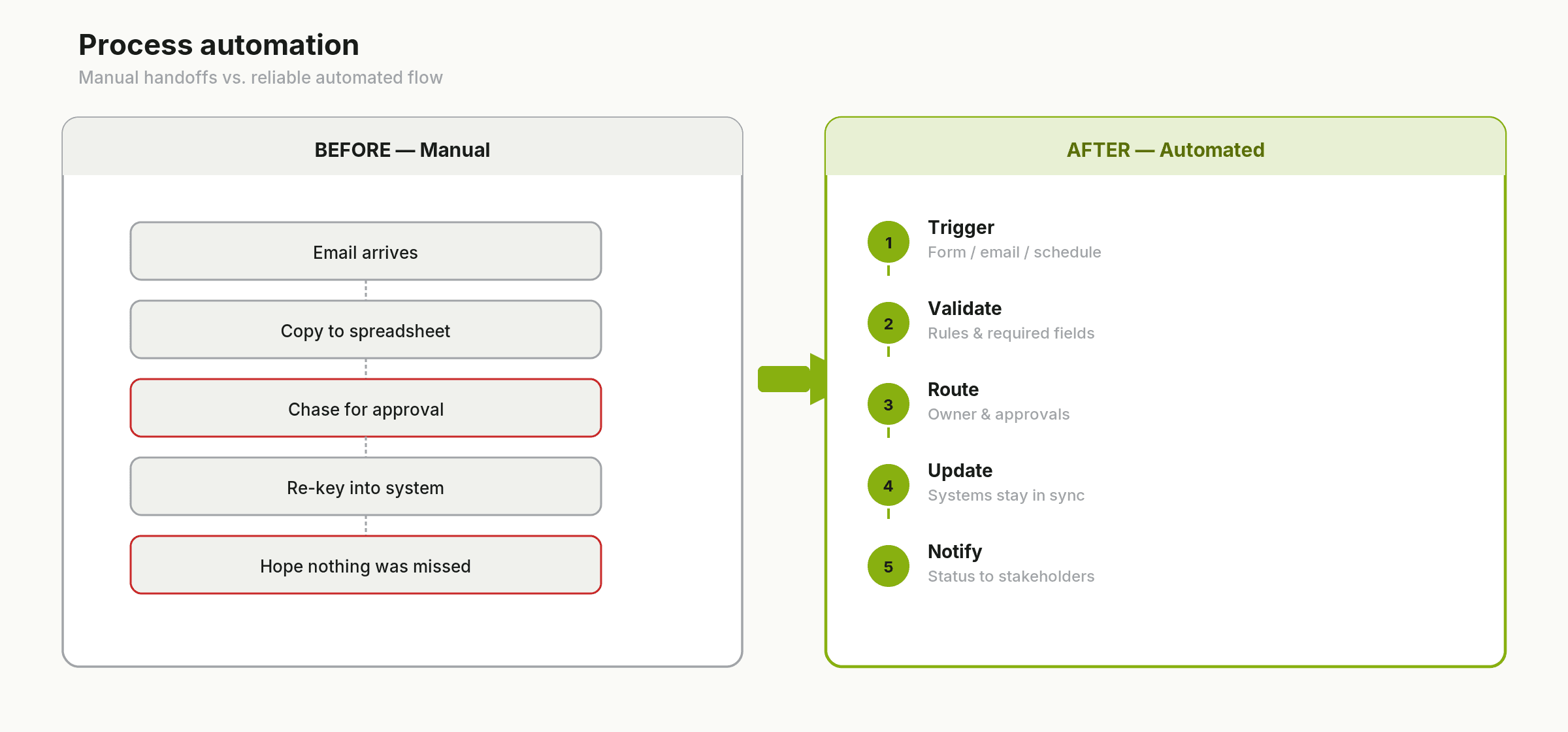
Workflow automation for small business usually means one of three things: an approval that lives in someone's inbox, data that gets typed in twice, or a report someone builds by hand every Monday. Projects that start with one of those three tend to work. The ones that start with 'we should automate everything' tend not to.
- 01Purchase orders, holiday requests and expenses waiting on a signature
- 02Form submissions copied into a spreadsheet, then into the CRM, then into accounts
- 03Status updates chased by email because nobody is told when something changes
- 04The Monday report, rebuilt by hand from three sources
What process automation covers
Approvals and sign-offs
Requests go to the right approver in Teams or Outlook, with reminders and an audit trail of who approved what and when.
Data between systems
A form, SharePoint list, CRM and accounting system kept in step, so details are entered once.
Scheduled reports
The figures pulled together and sent to the right people on a schedule, instead of rebuilt by hand.
Notifications and handovers
The right person told when a status changes, and work handed from sales to operations without an email chain.
Forms that replace paper and email
Microsoft Forms or Power Apps capturing information once, feeding a list and triggering the next step.
What you get
A simple map of how the process runs today and how it will run
- 01The automated workflow, built and tested with the people who use it
- 02Error handling and alerts, so a failed step is visible rather than silent
- 03Documentation covering what it does, who owns it and how to change it
- 04A handover session for the process owner
Next step
We reply within one working day. No obligation.
The tools we use
Power Automate for most workflows, SharePoint lists and libraries for data and documents, Microsoft Forms or Power Apps for capture, and Teams and Outlook for notifications. Where a process connects to your CRM, accounting or job system, we use the connector or API that system provides.
Already using Power Automate? Our Power Automate consulting covers flows someone else built: we review them, fix what is fragile and document what they do.
Where a step needs judgement, such as reading a free-text email or a PDF, see AI Workflow Automation.
How a process automation project runs
- 01
Understand
We sit with the people who run the process and map what really happens, including the workarounds.
- 02
Assess
We look at volume, time spent and error points, and decide what to automate, what to simplify and what to leave alone.
- 03
Improve
We build the workflow, test it on real cases and switch it on with the team.
- 04
Support
We fix anything that surfaces after go-live and, if you want, move on to the next process.
When automation is the wrong answer
If a process runs twice a month, changes every time, or depends on judgement calls, automating it may cost more than it saves. We would rather tell you that at the start than build something you stop using.
Where process automation fits
Convert gets a new enquiry into your CRM and followed up. Process automation takes over once the work is won: the order, the job sheet, the invoice, the approval. Both run on the same Microsoft 365 set-up, so nothing is retyped between them.
Example: purchase order approvals
A staff member fills in a short request form. Power Automate sends it to the budget holder in Teams, chases if nothing happens, and once approved saves the purchase order to SharePoint and tells finance. Nobody chases by email, and every approval is on record.
FAQs
Common questions
What is business process automation?
Using software to carry out the repeatable steps in a process, such as approvals, data entry, notifications and reports, so people only handle the parts that need judgement.
How is this different from AI workflow automation?
Process automation follows fixed rules: if this, then that. AI workflow automation adds a step that reads or classifies unstructured content first. If your steps are predictable, rules are cheaper and more reliable, so that is where we start.
Do we need extra Power Automate licences?
Many Microsoft 365 business plans include Power Automate for standard connectors. Premium connectors and some features need extra licensing. We check what you already have before designing anything.
Can you fix flows someone else built?
Yes. We review existing flows, fix the fragile parts, remove duplicates and document what each one does and who owns it.
Which process should we automate first?
One that happens often, follows clear rules and causes visible pain when it goes wrong. We help you choose in the free consultation.
Who looks after the automation afterwards?
You own it, in your tenant, with documentation. We can support it if you want us to, but you are not locked in.
What does it cost?
It depends on the process and the systems involved, so we scope each project after we understand it rather than publishing prices.
Pick the process that annoys everyone
Book a free consultation and walk us through it. We will tell you whether it is worth automating and what that would involve. We reply within one working day. Button: Book a free consultation · Secondary link: Start an enquiry